> ## Documentation Index
> Fetch the complete documentation index at: https://docs.redpill.ai/llms.txt
> Use this file to discover all available pages before exploring further.
# Introduction
> A confidential AI inference API you can verify. Every response is served from a TEE and backed by an attestation report and a signed receipt.
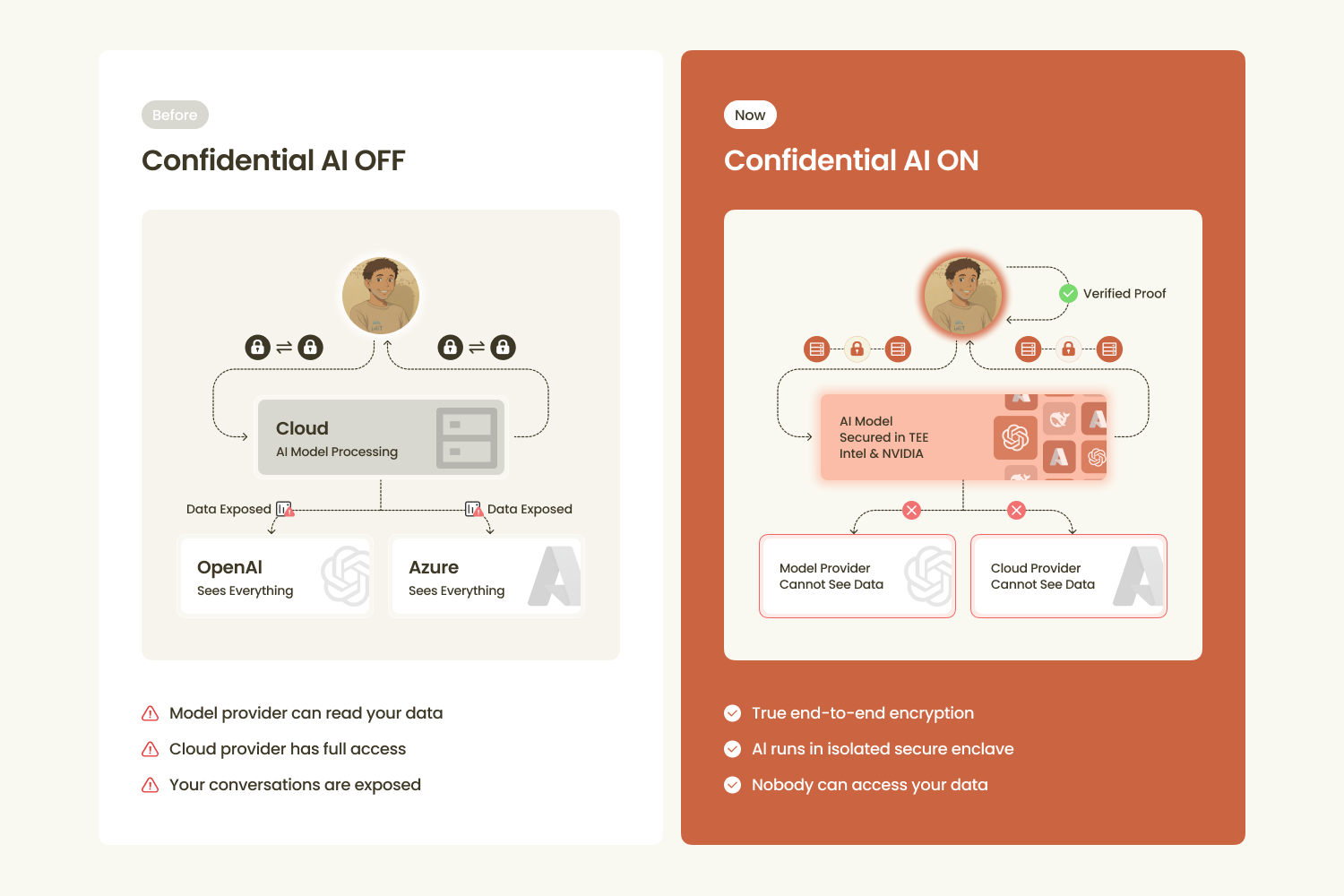 This is a confidential AI inference API. Every response is served by a gateway that runs inside a
Trusted Execution Environment (TEE), and comes with cryptographic evidence you can verify: an
attestation report proving which code served you, and a signed receipt binding your request and
response to that attested workload.
## Why it is different
The gateway runs in a TEE and proves it with a hardware-backed
[attestation report](/confidential-ai/attestation-report). It does not retain request or response
bodies.
Confidential models run on [verified TEE providers](/confidential-ai/providers), with the channel
bound before your prompt is forwarded.
Point your OpenAI or Anthropic SDK at the base URL. Same request and response shapes you already
use.
## Pick your path
For developers. Call confidential and standard models through one endpoint, with attestation and
signed receipts on every response.
For people who want a private AI assistant. End-to-end encrypted chat with confidential models and
private document search.
## Verify, don't trust
You do not have to take the API's word. After one request you can check, locally, that:
1. The gateway is a specific reviewed workload running in a genuine TEE.
[Attestation report →](/confidential-ai/attestation-report)
2. The response came from that workload, was not altered, and (for a confidential model) ran on a
verified upstream enclave. [Receipts →](/confidential-ai/receipts)
See [How confidential AI works](/confidential-ai/how-it-works) for the model, or
[Verify a response](/guides/verify-a-response) to run the checks.
## Start building
Create a key in the [dashboard](https://www.redpill.ai/dashboard) and store it as an environment
variable. See [Authentication](/get-started/authentication).
Point an OpenAI client library at `https://api.redpill.ai/v1`. See the
[Quickstart](/get-started/quickstart).
Fetch the attestation report and the receipt, then check the signatures and hashes.
[Verify a response](/guides/verify-a-response).
This is a confidential AI inference API. Every response is served by a gateway that runs inside a
Trusted Execution Environment (TEE), and comes with cryptographic evidence you can verify: an
attestation report proving which code served you, and a signed receipt binding your request and
response to that attested workload.
## Why it is different
The gateway runs in a TEE and proves it with a hardware-backed
[attestation report](/confidential-ai/attestation-report). It does not retain request or response
bodies.
Confidential models run on [verified TEE providers](/confidential-ai/providers), with the channel
bound before your prompt is forwarded.
Point your OpenAI or Anthropic SDK at the base URL. Same request and response shapes you already
use.
## Pick your path
For developers. Call confidential and standard models through one endpoint, with attestation and
signed receipts on every response.
For people who want a private AI assistant. End-to-end encrypted chat with confidential models and
private document search.
## Verify, don't trust
You do not have to take the API's word. After one request you can check, locally, that:
1. The gateway is a specific reviewed workload running in a genuine TEE.
[Attestation report →](/confidential-ai/attestation-report)
2. The response came from that workload, was not altered, and (for a confidential model) ran on a
verified upstream enclave. [Receipts →](/confidential-ai/receipts)
See [How confidential AI works](/confidential-ai/how-it-works) for the model, or
[Verify a response](/guides/verify-a-response) to run the checks.
## Start building
Create a key in the [dashboard](https://www.redpill.ai/dashboard) and store it as an environment
variable. See [Authentication](/get-started/authentication).
Point an OpenAI client library at `https://api.redpill.ai/v1`. See the
[Quickstart](/get-started/quickstart).
Fetch the attestation report and the receipt, then check the signatures and hashes.
[Verify a response](/guides/verify-a-response).