> ## Documentation Index
> Fetch the complete documentation index at: https://docs.redpill.ai/llms.txt
> Use this file to discover all available pages before exploring further.
# Private AI Proxy
> The desktop app and CLI that verifies the RedPill gateway on your machine and connects your agents to a verified local API.
Private AI Proxy runs on your computer. It signs in to your RedPill account, verifies the gateway's
attestation before any prompt leaves your machine, and gives your agents a local API so they never
hold your RedPill credential. It is open source in
[Dstack-TEE/private-ai-gateway](https://github.com/Dstack-TEE/private-ai-gateway/tree/main/apps/desktop)
and published by dstack TEE.
```text theme={null}
your agent → Local API on 127.0.0.1:4180 (agent-scoped token)
→ Private AI Proxy, verified and pinned channel
→ RedPill gateway (attested), signed receipt per response
```
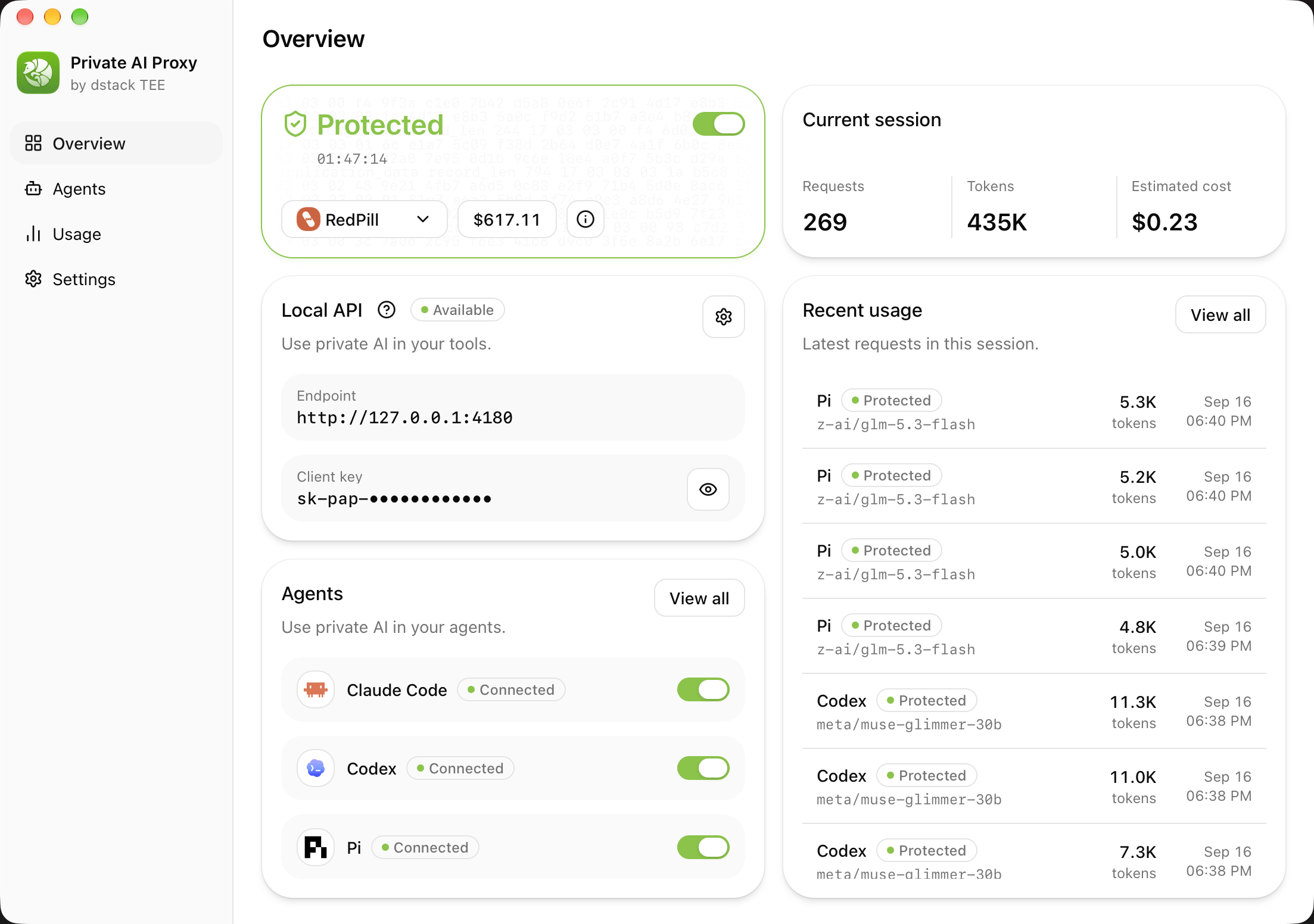
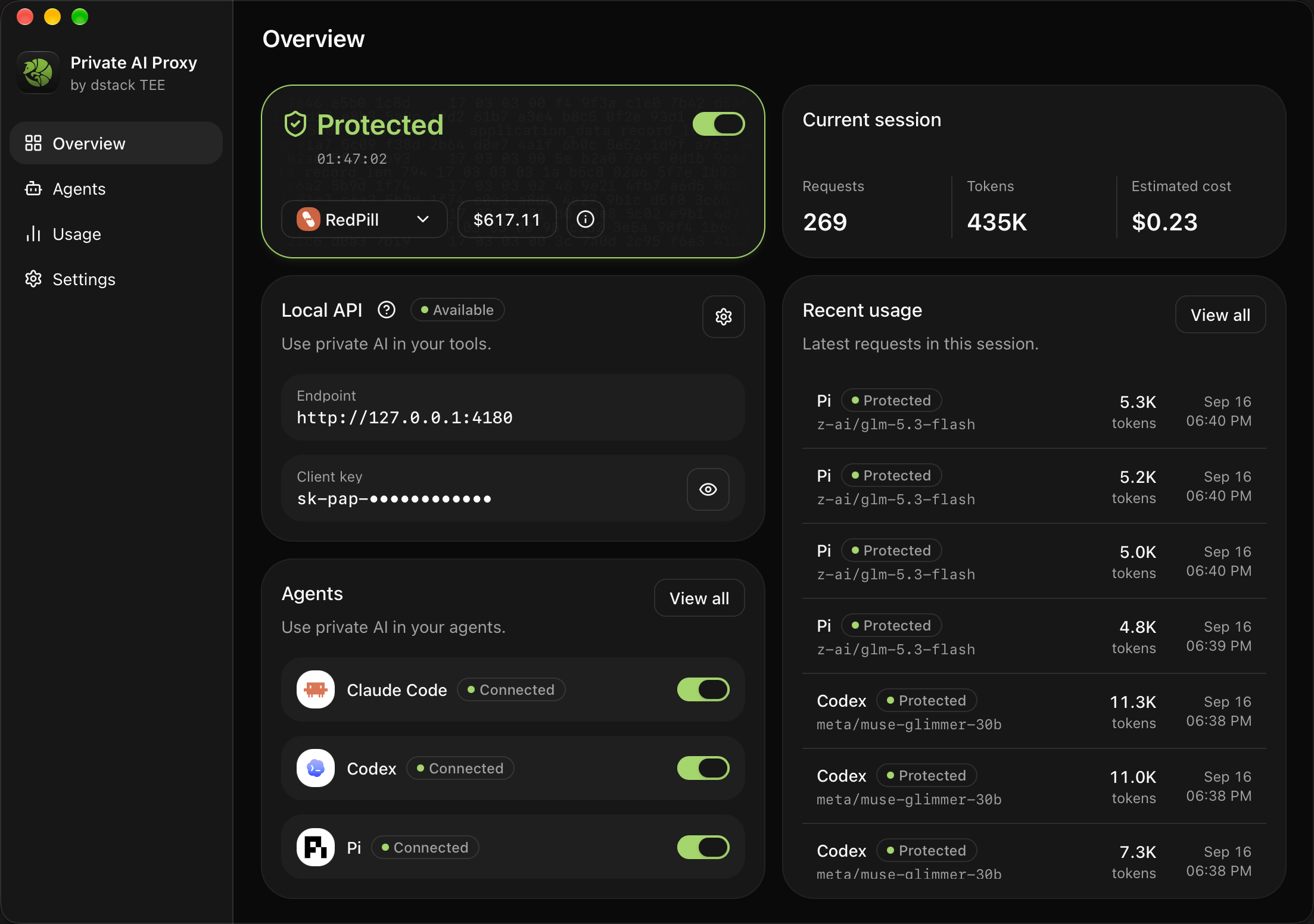 The sections below follow the app's screens: Profiles, Privacy, Agents, Local API, Usage, and
Settings, then the CLI.
## Install
[Start building](https://redpill.ai/start-building) detects your platform and offers the current
stable build. Direct links always resolve to the current stable release:
| Platform | Download |
| -------------------- | --------------------------------------------------------------------------------------------------------------------------------------------------------------------------------------------------------------------------------------------- |
| macOS, Apple Silicon | [`.dmg`](https://redpill.ai/download/private-ai-proxy/macos-arm64) |
| macOS, Intel | [`.dmg`](https://redpill.ai/download/private-ai-proxy/macos-x64) |
| Windows, x64 | [`.exe`](https://redpill.ai/download/private-ai-proxy/windows-x64) |
| Windows, ARM64 | [`.exe`](https://redpill.ai/download/private-ai-proxy/windows-arm64) |
| Linux, x64 | [`.deb`](https://redpill.ai/download/private-ai-proxy/linux-x64.deb) · [`.rpm`](https://redpill.ai/download/private-ai-proxy/linux-x64.rpm) · [Arch `.pkg.tar.zst`](https://redpill.ai/download/private-ai-proxy/linux-x64.pkg.tar.zst) |
| Linux, ARM64 | [`.deb`](https://redpill.ai/download/private-ai-proxy/linux-arm64.deb) · [`.rpm`](https://redpill.ai/download/private-ai-proxy/linux-arm64.rpm) · [Arch `.pkg.tar.zst`](https://redpill.ai/download/private-ai-proxy/linux-arm64.pkg.tar.zst) |
Every build, with checksums, is on the
[releases page](https://github.com/Dstack-TEE/private-ai-gateway/releases). The app updates itself
from the stable release channel.
## Profiles and sign-in
A profile is one RedPill workspace plus its credential. Add one with either:
* **Account login**: the app opens your browser, you approve it once and pick a workspace, and the
app receives an inference key for that workspace. The flow is a public OAuth client with PKCE and
a loopback callback on `127.0.0.1:4181`; no client secret or refresh token, and the sign-in token
stays in memory. If saving fails, **Retry** reuses the approval.
* **API key**: **Get API key** opens the [dashboard](https://www.redpill.ai/keys); paste the key.
Credentials live in the operating system's credential store, never in a plain file, and profile
exports never contain them. Sign in again or paste a new key to replace one; revoke old keys in the
dashboard. Phala Cloud profiles use the same form with Phala's device authorization; custom
endpoints accept API keys only.
## Privacy: what Protected does
Switching on **Protected** runs the ACI relying-party checks against the gateway with a fresh nonce:
1. the hardware quote verifies to the TEE vendor root and binds the report data;
2. the attested keyset digest matches the statement for that nonce;
3. the keyset has not expired;
4. source provenance names the public code the workload booted from; and
5. the TLS key actually used for the connection is in the attested keyset.
On success the app pins the channel to that keyset for the session and starts the Local API. If any
check fails, Protected stays off and no agent is connected. Stopping Protected, quitting the app, a
transport failure that cannot be recovered, or a later verification failure disconnects the agents
and restores their previous configuration. Verification is never restored from disk after a
restart; it is redone.
## Agents
The **Agents** screen lists the agents the app can configure. **Connect** writes RedPill into the
agent's own provider settings, in the protocol the agent speaks, with an agent-scoped token for the
Local API. **Disconnect** restores the file you had before; edits you made in the meantime are
preserved, and an incomplete restore stays retryable.
| Agent | Protocol | Where the app writes | After connecting |
| ----------- | ---------------- | ------------------------------------------------- | ---------------- |
| Claude Code | Messages | Claude Code settings | Restart `claude` |
| Codex | Responses | Custom model provider in `config.toml` | Restart `codex` |
| OpenCode | Chat Completions | `opencode.json` | Restart OpenCode |
| Pi | Chat Completions | Pi provider settings | Restart Pi |
| Hermes | Chat Completions | `config.yaml` | Restart Hermes |
| OpenClaw | Chat Completions | Native-host provider with a local token reference | Restart OpenClaw |
| Oh My Pi | Chat Completions | Local token and models file | Restart `omp` |
Only agents that are both connected and currently protected receive the Local API configuration.
Connecting from the CLI previews the change first and applies it with a revision, so a file that
changed in between is rejected rather than overwritten.
## Local API
While Protected is on, the app serves an OpenAI-compatible API on your machine:
| Field | Value |
| -------- | ----------------------------------------------------------------------- |
| Base URL | `http://127.0.0.1:4180/v1` |
| API key | The client key shown on the Overview and Local API screens (`sk-pap-…`) |
| Models | The verified catalog for the active profile |
Any tool that accepts an OpenAI-compatible endpoint can use it, for example
[Cline](/guides/integrations/coding-tools/cline). The Local API is plain HTTP on loopback; send
ordinary request bodies. It rejects end-to-end encryption headers because the app already owns the
verified channel, and it stops listening when Protected is off. Rotate the client key from the Local
API screen or `token rotate`.
## Usage
Responses stream to the agent immediately. The app fetches the signed receipt for each response
afterwards and audits it against the attestation. **Usage** records every request with the agent,
model, tokens, estimated cost, and the audit result; an audit failure is recorded but cannot recall
bytes the agent already received. The Overview screen shows the current session's totals. Usage can
be filtered, exported to CSV, and cleared.
## Settings
* **Connect on launch** starts protection when the background service starts.
* **Open at login** is an operating system preference set from the desktop app.
* **Advanced > Reset** stops protection, disconnects agents, and restores defaults while keeping
profiles, credentials, the local client key, and usage history.
* Closing the window does not stop the service; the tray's Stop All and Quit action does.
## CLI
`pap` drives the same background service without a window. The desktop app puts the command on
your PATH (automatically on macOS, from Settings > **private-ai-proxy command** on Windows); the
Linux packages install it system-wide. `private-ai-proxy` and `aci` are the same executable.
```bash theme={null}
pap doctor # every check, including credential store access
pap service start # background service
pap start --profile work # verify the gateway and turn on Protected
pap agents connect codex # add --model MODEL to pick a model yourself
pap status --json
pap stop # stop Protected and restore agent configuration
```
| Task | Command |
| ---------------------------- | ------------------------------------------------------------------------- |
| Service and protection | `service start`, `start`, `stop`, `status --watch` |
| Profiles and credentials | `profiles list/show/add/edit/verify/use/remove`, `token clear-credential` |
| Agents | `agents list/connect/disconnect/disconnect-all` |
| Catalog and usage | `models list --refresh`, `usage list/show/export/clear` |
| Local API settings and token | `settings show/set`, `token show/rotate` |
| Verify any ACI service | `verify `, `sessions `, `serve ` |
Credentials are entered through a hidden prompt or `--key-stdin`, never as an argument. For
scripts, `--json --non-interactive` returns data and `--yes` approves a change; agent changes are
previewed with `--dry-run` and applied with the returned `--revision`. Exit status is `0` on
success, `2` for invalid arguments, `1` for operation failures. `verify`, `sessions`, and `serve`
work against any ACI service without a profile; `serve` refuses to start unless verification passes.
## Troubleshooting
| Symptom | Check |
| ------------------------------------ | --------------------------------------------------------------------------------------- |
| Protected will not turn on | Run `pap doctor`; it reports every check separately, including credential store access. |
| An agent still uses its old provider | Confirm it shows **Connected**, that Protected is on, and restart the agent. |
| A tool cannot reach `127.0.0.1:4180` | Protected must be on; the Local API only listens during a verified session. |
| Settings look wrong after an update | Settings > Advanced > Reset. |
The sections below follow the app's screens: Profiles, Privacy, Agents, Local API, Usage, and
Settings, then the CLI.
## Install
[Start building](https://redpill.ai/start-building) detects your platform and offers the current
stable build. Direct links always resolve to the current stable release:
| Platform | Download |
| -------------------- | --------------------------------------------------------------------------------------------------------------------------------------------------------------------------------------------------------------------------------------------- |
| macOS, Apple Silicon | [`.dmg`](https://redpill.ai/download/private-ai-proxy/macos-arm64) |
| macOS, Intel | [`.dmg`](https://redpill.ai/download/private-ai-proxy/macos-x64) |
| Windows, x64 | [`.exe`](https://redpill.ai/download/private-ai-proxy/windows-x64) |
| Windows, ARM64 | [`.exe`](https://redpill.ai/download/private-ai-proxy/windows-arm64) |
| Linux, x64 | [`.deb`](https://redpill.ai/download/private-ai-proxy/linux-x64.deb) · [`.rpm`](https://redpill.ai/download/private-ai-proxy/linux-x64.rpm) · [Arch `.pkg.tar.zst`](https://redpill.ai/download/private-ai-proxy/linux-x64.pkg.tar.zst) |
| Linux, ARM64 | [`.deb`](https://redpill.ai/download/private-ai-proxy/linux-arm64.deb) · [`.rpm`](https://redpill.ai/download/private-ai-proxy/linux-arm64.rpm) · [Arch `.pkg.tar.zst`](https://redpill.ai/download/private-ai-proxy/linux-arm64.pkg.tar.zst) |
Every build, with checksums, is on the
[releases page](https://github.com/Dstack-TEE/private-ai-gateway/releases). The app updates itself
from the stable release channel.
## Profiles and sign-in
A profile is one RedPill workspace plus its credential. Add one with either:
* **Account login**: the app opens your browser, you approve it once and pick a workspace, and the
app receives an inference key for that workspace. The flow is a public OAuth client with PKCE and
a loopback callback on `127.0.0.1:4181`; no client secret or refresh token, and the sign-in token
stays in memory. If saving fails, **Retry** reuses the approval.
* **API key**: **Get API key** opens the [dashboard](https://www.redpill.ai/keys); paste the key.
Credentials live in the operating system's credential store, never in a plain file, and profile
exports never contain them. Sign in again or paste a new key to replace one; revoke old keys in the
dashboard. Phala Cloud profiles use the same form with Phala's device authorization; custom
endpoints accept API keys only.
## Privacy: what Protected does
Switching on **Protected** runs the ACI relying-party checks against the gateway with a fresh nonce:
1. the hardware quote verifies to the TEE vendor root and binds the report data;
2. the attested keyset digest matches the statement for that nonce;
3. the keyset has not expired;
4. source provenance names the public code the workload booted from; and
5. the TLS key actually used for the connection is in the attested keyset.
On success the app pins the channel to that keyset for the session and starts the Local API. If any
check fails, Protected stays off and no agent is connected. Stopping Protected, quitting the app, a
transport failure that cannot be recovered, or a later verification failure disconnects the agents
and restores their previous configuration. Verification is never restored from disk after a
restart; it is redone.
## Agents
The **Agents** screen lists the agents the app can configure. **Connect** writes RedPill into the
agent's own provider settings, in the protocol the agent speaks, with an agent-scoped token for the
Local API. **Disconnect** restores the file you had before; edits you made in the meantime are
preserved, and an incomplete restore stays retryable.
| Agent | Protocol | Where the app writes | After connecting |
| ----------- | ---------------- | ------------------------------------------------- | ---------------- |
| Claude Code | Messages | Claude Code settings | Restart `claude` |
| Codex | Responses | Custom model provider in `config.toml` | Restart `codex` |
| OpenCode | Chat Completions | `opencode.json` | Restart OpenCode |
| Pi | Chat Completions | Pi provider settings | Restart Pi |
| Hermes | Chat Completions | `config.yaml` | Restart Hermes |
| OpenClaw | Chat Completions | Native-host provider with a local token reference | Restart OpenClaw |
| Oh My Pi | Chat Completions | Local token and models file | Restart `omp` |
Only agents that are both connected and currently protected receive the Local API configuration.
Connecting from the CLI previews the change first and applies it with a revision, so a file that
changed in between is rejected rather than overwritten.
## Local API
While Protected is on, the app serves an OpenAI-compatible API on your machine:
| Field | Value |
| -------- | ----------------------------------------------------------------------- |
| Base URL | `http://127.0.0.1:4180/v1` |
| API key | The client key shown on the Overview and Local API screens (`sk-pap-…`) |
| Models | The verified catalog for the active profile |
Any tool that accepts an OpenAI-compatible endpoint can use it, for example
[Cline](/guides/integrations/coding-tools/cline). The Local API is plain HTTP on loopback; send
ordinary request bodies. It rejects end-to-end encryption headers because the app already owns the
verified channel, and it stops listening when Protected is off. Rotate the client key from the Local
API screen or `token rotate`.
## Usage
Responses stream to the agent immediately. The app fetches the signed receipt for each response
afterwards and audits it against the attestation. **Usage** records every request with the agent,
model, tokens, estimated cost, and the audit result; an audit failure is recorded but cannot recall
bytes the agent already received. The Overview screen shows the current session's totals. Usage can
be filtered, exported to CSV, and cleared.
## Settings
* **Connect on launch** starts protection when the background service starts.
* **Open at login** is an operating system preference set from the desktop app.
* **Advanced > Reset** stops protection, disconnects agents, and restores defaults while keeping
profiles, credentials, the local client key, and usage history.
* Closing the window does not stop the service; the tray's Stop All and Quit action does.
## CLI
`pap` drives the same background service without a window. The desktop app puts the command on
your PATH (automatically on macOS, from Settings > **private-ai-proxy command** on Windows); the
Linux packages install it system-wide. `private-ai-proxy` and `aci` are the same executable.
```bash theme={null}
pap doctor # every check, including credential store access
pap service start # background service
pap start --profile work # verify the gateway and turn on Protected
pap agents connect codex # add --model MODEL to pick a model yourself
pap status --json
pap stop # stop Protected and restore agent configuration
```
| Task | Command |
| ---------------------------- | ------------------------------------------------------------------------- |
| Service and protection | `service start`, `start`, `stop`, `status --watch` |
| Profiles and credentials | `profiles list/show/add/edit/verify/use/remove`, `token clear-credential` |
| Agents | `agents list/connect/disconnect/disconnect-all` |
| Catalog and usage | `models list --refresh`, `usage list/show/export/clear` |
| Local API settings and token | `settings show/set`, `token show/rotate` |
| Verify any ACI service | `verify `, `sessions `, `serve ` |
Credentials are entered through a hidden prompt or `--key-stdin`, never as an argument. For
scripts, `--json --non-interactive` returns data and `--yes` approves a change; agent changes are
previewed with `--dry-run` and applied with the returned `--revision`. Exit status is `0` on
success, `2` for invalid arguments, `1` for operation failures. `verify`, `sessions`, and `serve`
work against any ACI service without a profile; `serve` refuses to start unless verification passes.
## Troubleshooting
| Symptom | Check |
| ------------------------------------ | --------------------------------------------------------------------------------------- |
| Protected will not turn on | Run `pap doctor`; it reports every check separately, including credential store access. |
| An agent still uses its old provider | Confirm it shows **Connected**, that Protected is on, and restart the agent. |
| A tool cannot reach `127.0.0.1:4180` | Protected must be on; the Local API only listens during a verified session. |
| Settings look wrong after an update | Settings > Advanced > Reset. |